Some Loop Programs In C++

C++ while Loop

The syntax of a while loop is:

while (testExpression) 
{
     // codes  
}

where, testExpression is checked on each entry of the while loop.


How while loop works?

  • The while loop evaluates the test expression.
  • If the test expression is true, codes inside the body of while loop is evaluated.
  • Then, the test expression is evaluated again. This process goes on until the test expression is false.
  • When the test expression is false, while loop is terminated.

Flowchart of while Loop
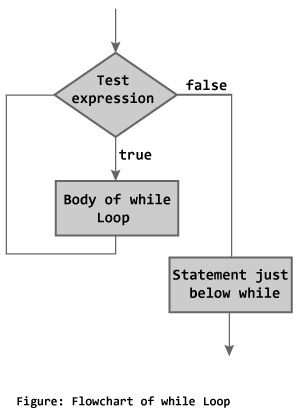
Flowchart of while loop in C++ Programming

Program 1: C++ while Loop

// C++ Program to compute factorial of a number
// Factorial of n = 1*2*3...*n

#include <iostream>
using namespace std;

int main() 
{
    int number, i = 1, factorial = 1;

    cout << "Enter a positive integer: ";
    cin >> number;
    
    while ( i <= number) {
        factorial *= i;      //factorial = factorial * i;
        ++i;
    }

    cout<<"Factorial of "<< number <<" = "<< factorial;
    return 0;
}

Output

Enter a positive integer: 4
Factorial of 4 = 24

In this program, user is asked to enter a positive integer which is stored in variable number. Let’s suppose, user entered 4.

Then, the while loop starts executing the code. Here’s how while loop works:

  1. Initially, i = 1, test expression i <= number is true and factorial becomes 1.
  2. Variable i is updated to 2, test expression is true, factorial becomes 2.
  3. Variable i is updated to 3, test expression is true, factorial becomes 6.
  4. Variable i is updated to 4, test expression is true, factorial becomes 24.
  5. Variable i is updated to 5, test expression is false and while loop is terminated.

C++ do…while Loop

The do…while loop is a variant of the while loop with one important difference. The body of do…while loop is executed once before the test expression is checked.

The syntax of do..while loop is:

do {
   // codes;
}
while (testExpression);

How do…while loop works?

  • The codes inside the body of loop is executed at least once. Then, only the test expression is checked.
  • If the test expression is true, the body of loop is executed. This process continues until the test expression becomes false.
  • When the test expression is false, do…while loop is terminated.

Flowchart of do…while Loop
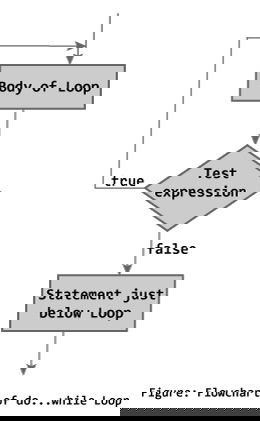
Flowchart of do while loop in C++ programming

Program 2: C++ do…while Loop

// C++ program to add numbers until user enters 0

#include <iostream>
using namespace std;

int main() 
{
    float number, sum = 0.0;
    
    do {
        cout<<"Enter a number: ";
        cin>>number;
        sum += number;
    }
    while(number != 0.0);

    cout<<"Total sum = "<<sum;
    
    return 0;
}

Output

Enter a number: 2
Enter a number: 3
Enter a number: 4
Enter a number: -4
Enter a number: 2
Enter a number: 4.4
Enter a number: 2
Enter a number: 0

C++ for Loop Syntax

for(initializationStatement; testExpression; updateStatement) {
    // codes 
}

where, only testExpression is mandatory.


How for loop works?

  1. The initialization statement is executed only once at the beginning.
  2. Then, the test expression is evaluated.
  3. If the test expression is false, for loop is terminated. But if the test expression is true, codes inside body of for loop is executed and update expression is updated.
  4. Again, the test expression is evaluated and this process repeats until the test expression is false.

Flowchart of for Loop in C++
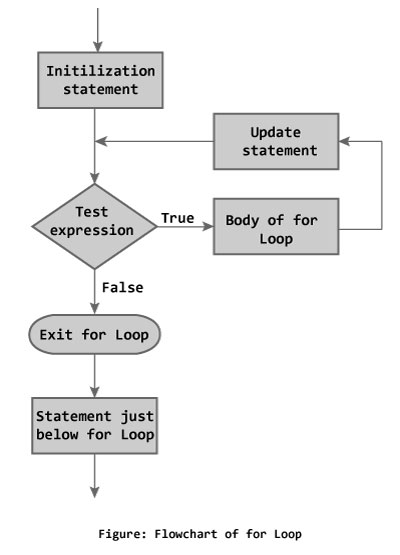
Flowchart of for loop in C++ Programming

Program 3: C++ for Loop

// C++ Program to find factorial of a number
// Factorial on n = 1*2*3*...*n

#include <iostream>
using namespace std;

int main() 
{
    int i, n, factorial = 1;

    cout << "Enter a positive integer: ";
    cin >> n;

    for (i = 1; i <= n; ++i) {
        factorial *= i;   // factorial = factorial * i;
    }

    cout<< "Factorial of "<<n<<" = "<<factorial;
    return 0;
}
Output

Enter a positive integer: 5
Factorial of 5 = 120

In the program, user is asked to enter a positive integer which is stored in variable n(suppose user entered 5). Here is the working of for loop:

  1. Initially, i is equal to 1, test expression is true, factorial becomes 1.
  2. i is updated to 2, test expression is true, factorial becomes 2.
  3. i is updated to 3, test expression is true, factorial becomes 6.
  4. i is updated to 4, test expression is true, factorial becomes 24.
  5. i is updated to 5, test expression is true, factorial becomes 120.
  6. i is updated to 6, test expression is false, for loop is terminated.

In the above program, variable i is not used outside of the for loop. In such cases, it is better to declare the variable in for loop (at initialization statement).

#include <iostream>
using namespace std;

int main() 
{
    int n, factorial = 1;

    cout << "Enter a positive integer: ";
    cin >> n;

    for (int i = 1; i <= n; ++i) {
        factorial *= i;   // factorial = factorial * i;
    }

    cout<< "Factorial of "<<n<<" = "<<factorial;
    return 0;
}

C++ Loop Types

There may be a situation, when you need to execute a block of code several number of times. In general, statements are executed sequentially: The first statement in a function is executed first, followed by the second, and so on.

Programming languages provide various control structures that allow for more complicated execution paths.

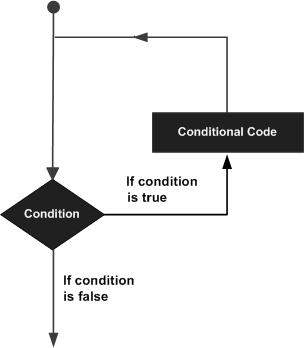
A loop statement allows us to execute a statement or group of statements multiple times and following is the general from of a loop statement in most of the programming languages −

Loop Architecture

C++ programming language provides the following type of loops to handle looping requirements.

Sr.NoLoop Type & Description
1while loop
Repeats a statement or group of statements while a given condition is true. It tests the condition before executing the loop body.
2for loop
Execute a sequence of statements multiple times and abbreviates the code that manages the loop variable.
3do…while loop
Like a ‘while’ statement, except that it tests the condition at the end of the loop body.
4nested loops
You can use one or more loop inside any another ‘while’, ‘for’ or ‘do..while’ loop.

Loop Control Statements

Loop control statements change execution from its normal sequence. When execution leaves a scope, all automatic objects that were created in that scope are destroyed.

C++ supports the following control statements.

Sr.NoControl Statement & Description
1break statement
Terminates the loop or switch statement and transfers execution to the statement immediately following the loop or switch.
2continue statement
Causes the loop to skip the remainder of its body and immediately retest its condition prior to reiterating.
3goto statement
Transfers control to the labeled statement. Though it is not advised to use goto statement in your program.

The Infinite Loop

A loop becomes infinite loop if a condition never becomes false. The for loop is traditionally used for this purpose. Since none of the three expressions that form the ‘for’ loop are required, you can make an endless loop by leaving the conditional expression empty.

#include <iostream>
using namespace std;
 
int main () {
   for( ; ; ) {
      printf("This loop will run forever.\n");
   }

   return 0;
}

When the conditional expression is absent, it is assumed to be true. You may have an initialization and increment expression, but C++ programmers more commonly use the ‘for (;;)’ construct to signify an infinite loop.

(NOTE − You can terminate an infinite loop by pressing Ctrl + C keys.)

Some Basic C++ Programs

Program 1: Program To Add Two Numbers

#include <iostream>
using namespace std;

int main()
{
    int firstNumber, secondNumber, sumOfTwoNumbers;
    
    cout << "Enter two integers: ";
    cin >> firstNumber >> secondNumber;

    // sum of two numbers in stored in variable sumOfTwoNumbers
    sumOfTwoNumbers = firstNumber + secondNumber;

    // Prints sum 
    cout << firstNumber << " + " <<  secondNumber << " = " << sumOfTwoNumbers;     

    return 0;
}

Output

Enter two integers: 4 
5
4 + 5 = 9

In this program, user is asked to enter two integers. These two integers are stored in variables firstNumber and secondNumber respectively.

Then, the variables firstNumber and secondNumber are added using + operator and stored in sumOfTwoNumbers variable.

Finally, sumOfTwoNumbers is displayed on the screen.

Program 2: C++ Program To Reverse An Integer

#include <iostream>
using namespace std;

int main()
{
    int n, reversedNumber = 0, remainder;

    cout << "Enter an integer: ";
    cin >> n;

    while(n != 0)
    {
        remainder = n%10;
        reversedNumber = reversedNumber*10 + remainder;
        n /= 10;
    }

    cout << "Reversed Number = " << reversedNumber;

    return 0;
}

Output

Enter an integer: 12345
Reversed number = 54321

This program takes an integer input from the user and stores it in variable n.

Then the while loop is iterated until n != 0 is false.

In each iteration, the remainder when the value of n is divided by 10 is calculated, reversedNumber is computed and the value of n is decreased 10 fold.

Finally, the reversedNumber (which contains the reversed number) is printed on the screen.

C++ Overview

C++ is a statically typed, compiled, general-purpose, case-sensitive, free-form programming language that supports procedural, object-oriented, and generic programming.

C++ was developed by Bjarne Stroustrup starting in 1979 at Bell Labs in Murray Hill, New Jersey, as an enhancement to the C language and originally named C with Classes but later it was renamed C++ in 1983.

Learning C++

The most important thing while learning C++ is to focus on concepts.

The purpose of learning a programming language is to become a better programmer; that is, to become more effective at designing and implementing new systems and at maintaining old ones.

C++ supports a variety of programming styles. You can write in the style of Fortran, C, Smalltalk, etc., in any language. Each style can achieve its aims effectively while maintaining runtime and space efficiency.

Use of C++

C++ is used by hundreds of thousands of programmers in essentially every application domain.

C++ is being highly used to write device drivers and other software that rely on direct manipulation of hardware under real time constraints.

C++ is widely used for teaching and research because it is clean enough for successful teaching of basic concepts.

Anyone who has used either an Apple Macintosh or a PC running Windows has indirectly used C++ because the primary user interfaces of these systems are written in C++.

Jumping Into C++ World

Hi everyone!

I’m Ashutosh Singh, your host on C++ Programming Language.

The purpose of this blog is to study techniques to write expressive code in C++. By expressive code we mean code that expresses the intent of the programmer that wrote it. Code you can read and understand. Code that says what it means to do.

I believe that expressiveness is the most important quality code can have, particularly in industry-sized projects, because expressive code is manageable. Expressive code is made for you to understand it.

This blog is about writing expressive code in C++. Along the posts we’ll explore how to precisely say what we mean, how to express ourselves, with the goal of becoming Fluent in C++.

Welcome to C++ Programming !